Dhun
Dhun (धुन — Hindi for melody) is a tiny native macOS app that turns whatever your music app is playing into a living piece of your desktop. At its smallest it is a borderless square of album art floating on your screen. At its biggest it is a full-screen visualizer that reacts to the actual sound coming out of your speakers.
It is 100% Swift — AppKit, SwiftUI and Metal. No Electron, no JavaScript, no web views. The whole app is about 1.4 MB, which is roughly the rounding error on an Electron app's installer. It needs macOS 13 or later and a music app it can talk to — Spotify or Apple Music. It is not affiliated with or endorsed by either.
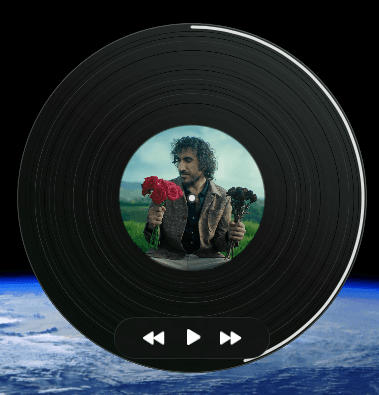
§What it does
It puts the album art on your desktop. Not in a window — there is no window. Just a square of cover art you can drag anywhere and forget about. Double-click it to jump to your music app, right-click for a quick menu, and if you throw it across the screen it keeps going and bounces off the edges, because someone had to write that physics and it may as well be fun. You can also make it click-through, so it is purely decorative and your cursor passes straight through it, or invisible to screen sharing, so your taste in music stays out of the standup.
It can be a record instead. Flip on the vinyl look and the square becomes a spinning record — actually spinning, actually stopping when you hit pause. It runs at 33⅓ RPM by default, and because the slider had to have ends, it goes from a 5 RPM crawl to a 78 RPM shellac panic. Five duotone colour schemes, or “Album colors”, which paints the grooves from the cover itself.
It reads the colours off every cover. Dhun looks at each new piece of art, works out the handful of colours that actually define it, and then uses them everywhere else — the glow around the square, the vinyl tint, the wallpaper, the visualizers. Change the song and the whole desktop quietly changes temperature with it.
It can take over your wallpaper. Every track change sets the desktop to the current album art: centred on a blurred version of itself, cropped edge to edge, or reduced to a gradient of its own colours. Or go further and put a spinning record on the desktop, rendered above the wallpaper but below your icons — so your files sit on top of a moving turntable, which is either delightful or a productivity crime, depending on your week.
It uses the notch for something. Slide your pointer up to the camera notch and it expands into a little island with the artwork, a progress bar and playback controls. The notch was going to sit there being a notch anyway.
And it has a full-screen mode. Ambient mode fills the display with a now-playing scene — the cover, big type, and behind it either a slow drifting blur or one of the visualizers below. Click or hit Esc to come back to real life.
Every single thing in that list is a switch. None of it is on by default and all of it lives in a normal Settings window (⌘,), because an app that redecorates your desktop without asking is a virus with a nice colour palette.
§The visualizers
The headline of v1.1 is eight full-screen generative scenes, rendered in Metal, in ambient mode. One design rule was set on day one and never bent: never a bar chart. No equalizer bars, no spectrum columns, no bouncing waveform. Music visualizers stopped being interesting the day they became a readout.
Instead the sound is a set of hands on the controls. Bass shoves large masses around, mids stir up turbulence, highs add the fine flicker, and every scene keeps living during the quiet bits rather than collapsing into a flat line.
- Ambience Plasma — energy clouds and tendrils, in open homage to the Windows Media Player era. Original.
- Ink in Water — ink blooms that bleed into their own previous frames, so the picture slowly remembers the song. Original.
- Murmuration — a flock of 14,000 birds with trails, simulated on the GPU. Original.
- Movement — the spectrum bent into a breathing ring of light and then smeared into drifting paint. Original.
- Volumetric Explosion — explosions that go off only on real bass hits, and never repeat themselves. Adapted from “Volumetric explosion” by Duke.
- MoonWalk — a moonlit flight that speeds up and slows with the music, without ever teleporting. Adapted from Nikos Papadopoulos (4rknova).
- Cloud Canal — a drifting tunnel of cloud. Deliberately deaf to the music; only its colours follow along. Adapted from Stéphane Cuillerdier (Aiekick).
- Calm Flow — serene isoline flow, also deliberately unreactive. Adapted from Sebastien Durand.
Each scene takes one of five colour moods, or the live palette of whatever is playing. A React to sound switch turns the reaction off — and with it, all audio capture. There is also a debug overlay with the raw waveform, the real frame rate, and buttons to hop between scenes, which exists for reasons that become clear two sections down.
§How it hears the music
macOS has no public “what is this app playing” audio API, which is a problem when the entire point is reacting to what an app is playing. The route around it:
- ScreenCaptureKit captures system audio, filtered to the music app's own process. The API insists on also giving you video, so Dhun asks for a 2×2 pixel stream at one frame per second and throws every frame away — about as close to free as Apple will let you get. The microphone is never touched. If the filtered stream comes back silent, because the audio is travelling via some helper process, a watchdog gives up after three seconds and captures the whole display instead.
- An FFT through Accelerate's vDSP — 1024 samples, Hann window — reduces the sound to 48 log-spaced bands from about 45 Hz to 16 kHz.
- Those bands become four smoothed signals — bass, mid, high, overall level — each with its own attack and decay, so bass is slow and heavy and highs are twitchy. On top sits a bass-onset detector: bass jumping above its own long-run average, as a ratio rather than a threshold, so it still fires on EDM masters compressed to within an inch of their lives. A cooldown makes sure one drop is one event. That is what sets off the explosions.
- A single Metal view then renders three different ways: plain fragment shaders, ping-pong feedback for the scenes that eat their own past, and a compute-driven particle system for the flock. The expensive raymarchers quietly render at lower resolution and scale up.
Track titles, artwork and the playback controls come the boring old way: Apple events, which is to say AppleScript, which is to say the most durable API on the platform.
§Three things that went sideways
The permission saga. The visualizers need macOS's Screen & System Audio Recording permission. For a while, the waveform went flat after every single rebuild. The reason: macOS ties a permission grant to the app's code signature, ad-hoc signatures change on every build, so every rebuild was quietly revoking the grant — and macOS does not ask twice after a denial. The fix was a local self-signed “Dhun Dev” certificate so the signature stops changing; the repo ships scripts/make-signing-cert.sh to make one. The debug overlay was born during this, purely to answer “is any sound arriving at all, or am I debugging a beautiful picture of silence?”
The license pivot. v1.0 shipped under MIT. But the best visualizer material in the world lives on Shadertoy, and Shadertoy's default license is CC BY-NC-SA 3.0, which MIT distribution cannot legally absorb. So the whole project moved to CC BY-NC-SA 4.0, with attribution in the source, the README and the app's About tab. The trade is permanent: Dhun can never be sold while those shaders are in it. Picking a worse license on purpose was the price of beautiful things. (v1.0 stays MIT — that grant cannot be taken back.)
The Gatekeeper problem. Dhun is not notarized, which costs $99 a year, so a DMG downloaded in a browser gets the “Apple could not verify this app” dialog — and macOS Sequoia removed the old right-click-to-open escape hatch. The workaround is a one-liner. Browsers stamp downloads with a quarantine flag; curl does not, so an app installed this way just opens. It is exactly the trick Homebrew plays on itself.
curl -fsSL https://raw.githubusercontent.com/Ayush-pbh/dhun/main/install.sh | shThere is a Homebrew tap as well — brew install --cask ayush-pbh/tap/dhun. Worth being honest about it: Homebrew 6 removed the --no-quarantine flag, so brew installs of unnotarized apps now hit the same dialog. The tap buys you brew upgrade, not a quieter install. Getting into the official cask repo requires “notability”, which is measured in GitHub stars — about 75 of them.
§Curation by murder
Far more visualizers were built than shipped. Nebula, Ferrofluid, Aurora, Warp Field, Butterfly (album art warped by the spectrum, with mirrored wings), Gilled (a reaction-diffusion simulation fed by bass hits), Dream and an early Ambience ring were all finished, played against real music, and cut. The eight that shipped are survivors of a taste filter, not entries on a feature list.
§By the numbers
- ~1.4 MB to download, against ~100 MB where Electron apps start
- 100% Swift, zero JavaScript
- 8 visualizers shipped, about 7 more built and deleted
- 14,000 birds in the flock
- 1024 samples in, 48 bands out, 60 frames a second
- 2×2 pixels — the video stream nobody wanted but the API demanded
- 2 releases: v1.0.0, the square-and-vinyl era, then v1.1.0, the visualizer era
Dhun was built with Claude Code doing the typing, and me doing the arguing about what was worth keeping.